

Agentic AI
Unleashing AI Creativity with n8n: Automation Made Simple 🎨🤖**
Building truly personalised AI experiences

Mondweep Chakravorthy
Building Personalised AI Assistants With n8n And Why It Matters For CFOs
As a CFO, you probably hear a lot of noise about artificial intelligence, automation, and digital transformation. The real question in your mind is more practical. How do these tools actually help my P&L, my working capital, my staff capacity. A personalised AI assistant, delivered through tools like n8n, Telegram, OpenAI, Google Gemini, and Hugging Face, is no longer a toy for tech teams. It is becoming a very direct lever for efficiency, customer experience, and even new digital revenue streams.
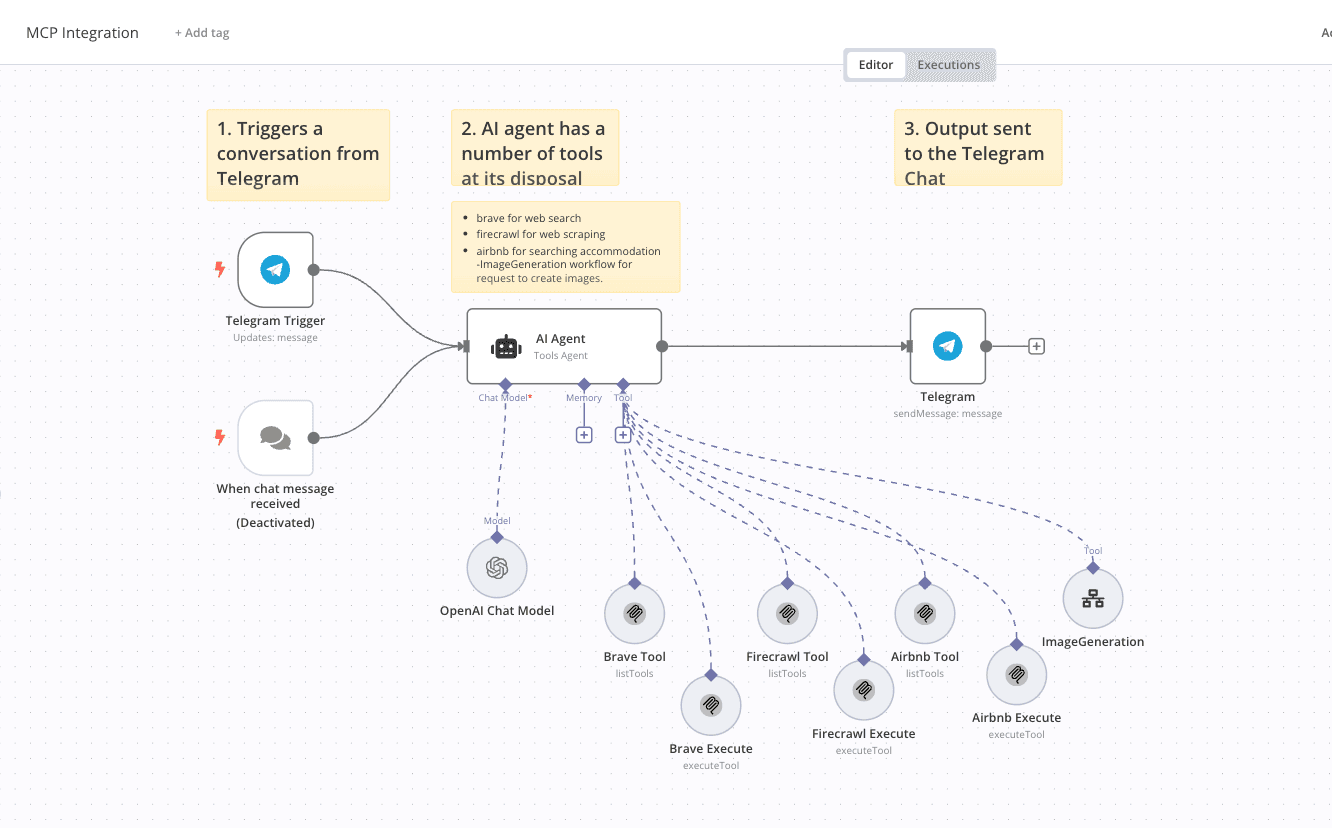
The workflow described here uses n8n as the orchestration engine to connect a Telegram chat interface with AI agents, web search, web scraping, accommodation search, and image generation. That might sound quite technical at first glance, but for you as a finance leader, this is essentially a way to turn a simple chat window into a multi purpose digital colleague. One that can research, draft, summarise, and even create visual content on demand, without having to hire another team of analysts or designers.
What This Workflow Actually Does In Business Terms
At a high level, this n8n setup creates a single conversational interface in Telegram that can do several things. It can perform real time web searches using Brave, scrape structured information from websites with Firecrawl, query accommodation options with an Airbnb integration, and generate custom AI images using Hugging Face models. User messages go in, the AI agent interprets intent, calls the right tools, and sends the result back, again over Telegram.
In practice this means that someone in your organisation can ask in plain language for market information, competitor data, accommodation for a client visit, or marketing visuals for a campaign. They get back structured answers or images within that same chat. There is no need to log into multiple systems, open more tabs, or chase different teams. For a CFO looking for operational efficiency, this unified interface reduces fragmentation and wasted time.
What makes this especially relevant for finance leadership is that the workflow is built with n8n, a low code automation platform. You do not need a large development team to configure workflows, connect APIs, and adjust logic as your needs change. This is how you can pilot personalised AI experiences at relatively low cost, then scale them as the value becomes clear.
Key Components Explained In Simple Language
Main Workflow: The Front Door To Your AI Assistant
The main workflow in n8n is like the front desk of a hotel. Everything starts here. It listens for new messages that come in via Telegram. When a user types a request, the Telegram Trigger node captures it. The message is then passed to an AI Agent node, which is powered by LangChain and the OpenAI gpt 4o mini model.
The AI agent reads the message and decides what it needs to do. The agent has access to several tools connected through MCP servers. Brave is used for web search, Firecrawl for website scraping, Airbnb for accommodation lookups, and a dedicated ImageGeneration tool that calls a subworkflow. If the user asks for a picture, it triggers the image generation subworkflow. If they ask for a hotel in Berlin next week under a specific budget, it uses the Airbnb tool. If they want to summarise a competitor webpage, the agent uses Firecrawl.
From a finance point of view, this is quite powerful, because you do not have to build many separate chatbots for each function. One AI agent, configured carefully, decides when to call each tool and then sends back a clear response over Telegram. The OpenAI chat model node is the language brain; Brave, Firecrawl, Airbnb, and ImageGeneration are the arms and legs.
Subworkflow: Image Generation Workflow As A Reusable Service
The Image Generation Workflow acts like a specialised design assistant. It receives a query from the main workflow, for example “create a photorealistic image of our new logistics centre at sunset for a pitch deck.” The subworkflow then interacts with the user again to ask which style they prefer. This is handled via a Telegram form that presents a dropdown of styles such as Hyper Surreal Escape or Post Analog Glitchscape.
Once the user chooses a style, the workflow routes logic through a Switch node that sends the process down the relevant path. Each path has an Edit Fields node which defines a stylePrompt. That is a detailed piece of text that tells the AI image model how to render the image in that specific look and feel. Finally, the workflow merges the original user query with the stylePrompt, passes it to an AI agent that shapes the final prompt, and calls the Hugging Face Inference API. The image generated is then sent back to the user via Telegram.
In short, this is a reusable micro service inside your automation landscape, designed around AI image generation. It is tailored enough to support marketing, product, or investor relations teams, while still being orchestrated from the same main workflow that powers search and research tasks.
Why Personalised AI Experiences Matter For CFOs
From your position, the important questions are usually around cost, control, and measurable outcomes. A personalised AI assistant that integrates search, scraping, and image generation can impact all three. It reduces the need for repetitive manual work, lets smaller teams produce higher quality outputs, and opens doors to new services you can offer customers or internal stakeholders.
For example, imagine your marketing team preparing investor materials. Instead of briefing a designer for each variation of a slide image, they use Telegram to request multiple image styles in minutes. The AI image workflow generates high quality visuals based on a clear stylePrompt, aligned with your brand. This does not completely remove the need for designers, but it changes when you use them. They focus on the highest value work, instead of quick variations and simple graphics that an AI can handle.
Another scenario: your sales or customer success teams are planning travel for key client visits. They can ask the same Telegram assistant to search for accommodation near the client office, see options within agreed travel policies, and receive a short list that respects budget caps. This blends Airbnb search, web scraping for local context, and AI summarisation in one conversation. You get better adherence to policy and less time wasted on manual searching.
For finance shared services, the AI assistant can support ad hoc research. A controller might ask the assistant to pull public information about a supplier, scrape basic financial data from their website, and summarise it for a vendor risk review. While this is not a substitute for a full due diligence, it gives the team a fast starting point and frees time for deeper analysis where needed.
What You Need To Put In Place
1. The Right Credentials And Infrastructure
To run this type of workflow, your organisation needs API credentials for Telegram, Hugging Face, OpenAI, Google Gemini, and your MCP client that connects Brave, Firecrawl and Airbnb. Your n8n instance also needs internet access, and ideally should be deployed in an environment managed by IT, with proper security controls and monitoring.
From a CFO perspective, you will want your technology and security teams to validate that API keys are stored securely, access is logged, and usage is monitored. You might set budget thresholds for API spend, especially on generative models like OpenAI and Hugging Face, so that sudden spikes are detected early.
2. Governance Around Data And Usage
The power of a personalised AI assistant can also create risk, if it is not governed. You should be clear about what kind of data employees are allowed to send through the assistant. For confidential financial details, M&A information, or personal data, you may restrict usage or use private models and self hosted components instead of public APIs.
Define simple internal guidelines. For example, allow the assistant for market research, preliminary supplier screening, pitch deck visuals, and basic travel planning. Disallow it for confidential board documents, internal HR data, or any legally sensitive correspondence. Then ask your technology leader to configure the workflows accordingly, perhaps by logging requests and masking certain types of data.
3. Clear Use Cases Tied To Financial Outcomes
The most successful AI automation initiatives tend to start with very specific use cases, not vague transformation slogans. For this workflow, the strongest early use cases usually come from marketing, sales, and operations. For instance, marketing teams can use AI image generation to create campaign assets for A B testing, social posts, and landing pages. This speeds up creative cycles and reduces small external design invoices. Sales teams can obtain tailored content and visuals for proposals, and quick research on prospects, which can shorten sales cycles or increase conversion rates.
As CFO, you might ask each department to propose one or two use cases with a simple business case. How much time can we save per month. What external cost can we reduce. Is there potential incremental revenue from faster responses or more personalised materials. Even rough numbers are enough to decide whether it is worth piloting.
Concrete Examples A CFO Can Relate To
Example 1: Reducing External Design Spend
Consider a mid sized company spending 100,000 pounds a year on design agencies. A large portion of that is for quick visual assets, social banners, internal diagrams, and pitch images. By introducing this AI image generation workflow, you might aim to replace 20 to 30 percent of that work with AI generated drafts. Internal teams can generate images in different styles, then only send the final selection to designers for refinement if needed.
If you manage to shift 25 percent of small jobs to the AI assistant, that could be 25,000 pounds saved annually, or reallocated to higher impact creative projects. The cost of the n8n workflow, Telegram integration, and AI model usage is usually far lower than that amount, even accounting for some set up and maintenance.
Example 2: Faster Proposal Turnaround For Sales
Imagine your sales teams often need tailored proposal decks with local imagery or custom visuals for client examples. Currently they might wait 2 or 3 days for internal design support. With this workflow, a salesperson can open Telegram, describe the scene they need, choose a style from the dropdown, and receive a set of images within minutes. They can include those in a proposal the same day.
If this improved responsiveness helps close even a small number of additional deals each year, the revenue impact can quickly exceed the cost. For instance, landing just one extra contract of 150,000 pounds margin because you delivered a polished, tailored proposal faster, could pay for the entire AI experimentation budget for the year.
Example 3: Research Support For Finance And Strategy
Your strategy or FP&A team regularly needs quick background on markets, competitors, or technology vendors. Instead of manually browsing multiple websites, they can ask the AI assistant over Telegram for a structured summary. The AI agent uses Brave to search, Firecrawl to scrape selected pages, and then summarises key points, such as pricing models, customer segments, or product features.
Say your analysts each spend an hour a day on preliminary research, and the assistant can cut that in half. Over a team of five analysts, that is more than 500 hours a year saved. You might not reduce headcount, but you gain significant capacity to focus on deeper modelling, scenario analysis, and board level materials.
How To Start Small Without Losing Control
Step 1: Run A Limited Pilot With Clear Boundaries
The smartest way to introduce a personalised AI assistant is to pilot with one or two departments and a controlled group of users. Marketing and sales are often good starting points, because they see immediate value from AI generated images and research. Define a small time bound experiment, for example three months, with agreed KPIs like reduced external design spend, faster proposal cycles, or improved campaign throughput.
Ask your CTO or CIO partner to set up the n8n workflows in a test environment, connect Telegram for internal use only, and restrict the tools to non confidential data sources. Measure usage, gather feedback, and monitor AI model costs. This helps you get real numbers instead of theoretical discussions.
Step 2: Track Costs And Benefits In A Simple Way
You do not need a sophisticated AI accounting model on day one. Start with a basic cost tracking sheet that includes n8n hosting, API fees for OpenAI, Hugging Face, and Gemini, as well as any MCP client licensing. On the benefit side, estimate hours saved, external spend avoided, and any incremental revenue from improved responsiveness or customer experience.
Every month, review the numbers with the pilot teams. If the benefits clearly outweigh the costs, you can scale. If not, you either adjust the workflows or decide this is not the right fit. Treat it like any other investment case, just with shorter feedback loops.
Step 3: Decide On A Scaling Model
If the pilot succeeds, you will need a plan to scale securely and consistently. Some organisations create a small internal automation and AI team that owns the n8n workflows, maintains API connections, and helps business units define new use cases. Others work with a partner who has experience in enterprise AI orchestration. As CFO, your role is to ensure that scaling is done with clear governance, defined cost controls, and measurable outcomes.
You might set a budget envelope for AI and automation experiments, with simple rules. Projects need a basic business case, they are reviewed quarterly, and they must connect to clear business metrics such as cycle time, error rate, or operating margin. This level of discipline keeps enthusiasm aligned with financial reality.
Key Risks To Watch, Without Blocking Innovation
With any powerful tool, there are real risks. Data leakage, inconsistent messaging, and shadow IT are common concerns. To limit these, insist that all AI automations, including this n8n Telegram assistant, are registered with IT and security. Ensure there is a clear inventory of which models and APIs are in use, what data flows through them, and who can access which workflows.
Also be aware of quality risk. AI generated images and content can be impressive but occasionally inaccurate or off brand. You should treat AI outputs like drafts that require a human check, especially for customer facing or legal content. Make that expectation explicit in your internal guidelines.
Finally, keep an eye on vendor dependency. This workflow currently uses OpenAI, Google Gemini, Hugging Face, Brave, and others. The advantage of n8n is that you can swap components relatively easily if pricing or policy changes. Encourage your team to design workflows in a modular way, so you are not locked into one specific model provider forever.
Summary: What A CFO Should Remember
To wrap things up, think of this n8n based personalised AI assistant as a flexible digital colleague that sits inside Telegram. It can search the web, scrape data, find accommodation, and generate images in different styles, by orchestrating OpenAI, Google Gemini, Hugging Face, and other tools. The main workflow interprets user intent and sends tasks to the right tool, while the image generation subworkflow handles style selection and prompt building in a structured way.
For you as a CFO, the real value lies in faster execution, lower external spend on routine tasks, and potential new revenue opportunities from more personalised digital experiences. The set up requires API credentials, secure infrastructure, and basic governance on data usage, but it does not require a huge development team. You can start with a small pilot, tie it to clear business outcomes, monitor costs closely, and scale only when the numbers prove themselves.
If you remember just a few things, let them be these. Start small, with well defined use cases. Treat AI assistants like powerful but imperfect colleagues whose work needs review. Keep cost tracking simple and transparent. And work closely with your CIO or CTO to ensure the workflows are secure, maintainable, and adaptable. Approached in this way, a personalised AI assistant built on n8n is not just a shiny gadget, it can be a practical tool that supports your strategy, your team, and your financial results.
Building Personalised AI Assistants With n8n And Why It Matters For CFOs
As a CFO, you probably hear a lot of noise about artificial intelligence, automation, and digital transformation. The real question in your mind is more practical. How do these tools actually help my P&L, my working capital, my staff capacity. A personalised AI assistant, delivered through tools like n8n, Telegram, OpenAI, Google Gemini, and Hugging Face, is no longer a toy for tech teams. It is becoming a very direct lever for efficiency, customer experience, and even new digital revenue streams.
The workflow described here uses n8n as the orchestration engine to connect a Telegram chat interface with AI agents, web search, web scraping, accommodation search, and image generation. That might sound quite technical at first glance, but for you as a finance leader, this is essentially a way to turn a simple chat window into a multi purpose digital colleague. One that can research, draft, summarise, and even create visual content on demand, without having to hire another team of analysts or designers.
What This Workflow Actually Does In Business Terms
At a high level, this n8n setup creates a single conversational interface in Telegram that can do several things. It can perform real time web searches using Brave, scrape structured information from websites with Firecrawl, query accommodation options with an Airbnb integration, and generate custom AI images using Hugging Face models. User messages go in, the AI agent interprets intent, calls the right tools, and sends the result back, again over Telegram.
In practice this means that someone in your organisation can ask in plain language for market information, competitor data, accommodation for a client visit, or marketing visuals for a campaign. They get back structured answers or images within that same chat. There is no need to log into multiple systems, open more tabs, or chase different teams. For a CFO looking for operational efficiency, this unified interface reduces fragmentation and wasted time.
What makes this especially relevant for finance leadership is that the workflow is built with n8n, a low code automation platform. You do not need a large development team to configure workflows, connect APIs, and adjust logic as your needs change. This is how you can pilot personalised AI experiences at relatively low cost, then scale them as the value becomes clear.
Key Components Explained In Simple Language
Main Workflow: The Front Door To Your AI Assistant
The main workflow in n8n is like the front desk of a hotel. Everything starts here. It listens for new messages that come in via Telegram. When a user types a request, the Telegram Trigger node captures it. The message is then passed to an AI Agent node, which is powered by LangChain and the OpenAI gpt 4o mini model.
The AI agent reads the message and decides what it needs to do. The agent has access to several tools connected through MCP servers. Brave is used for web search, Firecrawl for website scraping, Airbnb for accommodation lookups, and a dedicated ImageGeneration tool that calls a subworkflow. If the user asks for a picture, it triggers the image generation subworkflow. If they ask for a hotel in Berlin next week under a specific budget, it uses the Airbnb tool. If they want to summarise a competitor webpage, the agent uses Firecrawl.
From a finance point of view, this is quite powerful, because you do not have to build many separate chatbots for each function. One AI agent, configured carefully, decides when to call each tool and then sends back a clear response over Telegram. The OpenAI chat model node is the language brain; Brave, Firecrawl, Airbnb, and ImageGeneration are the arms and legs.
Subworkflow: Image Generation Workflow As A Reusable Service
The Image Generation Workflow acts like a specialised design assistant. It receives a query from the main workflow, for example “create a photorealistic image of our new logistics centre at sunset for a pitch deck.” The subworkflow then interacts with the user again to ask which style they prefer. This is handled via a Telegram form that presents a dropdown of styles such as Hyper Surreal Escape or Post Analog Glitchscape.
Once the user chooses a style, the workflow routes logic through a Switch node that sends the process down the relevant path. Each path has an Edit Fields node which defines a stylePrompt. That is a detailed piece of text that tells the AI image model how to render the image in that specific look and feel. Finally, the workflow merges the original user query with the stylePrompt, passes it to an AI agent that shapes the final prompt, and calls the Hugging Face Inference API. The image generated is then sent back to the user via Telegram.
In short, this is a reusable micro service inside your automation landscape, designed around AI image generation. It is tailored enough to support marketing, product, or investor relations teams, while still being orchestrated from the same main workflow that powers search and research tasks.
Why Personalised AI Experiences Matter For CFOs
From your position, the important questions are usually around cost, control, and measurable outcomes. A personalised AI assistant that integrates search, scraping, and image generation can impact all three. It reduces the need for repetitive manual work, lets smaller teams produce higher quality outputs, and opens doors to new services you can offer customers or internal stakeholders.
For example, imagine your marketing team preparing investor materials. Instead of briefing a designer for each variation of a slide image, they use Telegram to request multiple image styles in minutes. The AI image workflow generates high quality visuals based on a clear stylePrompt, aligned with your brand. This does not completely remove the need for designers, but it changes when you use them. They focus on the highest value work, instead of quick variations and simple graphics that an AI can handle.
Another scenario: your sales or customer success teams are planning travel for key client visits. They can ask the same Telegram assistant to search for accommodation near the client office, see options within agreed travel policies, and receive a short list that respects budget caps. This blends Airbnb search, web scraping for local context, and AI summarisation in one conversation. You get better adherence to policy and less time wasted on manual searching.
For finance shared services, the AI assistant can support ad hoc research. A controller might ask the assistant to pull public information about a supplier, scrape basic financial data from their website, and summarise it for a vendor risk review. While this is not a substitute for a full due diligence, it gives the team a fast starting point and frees time for deeper analysis where needed.
What You Need To Put In Place
1. The Right Credentials And Infrastructure
To run this type of workflow, your organisation needs API credentials for Telegram, Hugging Face, OpenAI, Google Gemini, and your MCP client that connects Brave, Firecrawl and Airbnb. Your n8n instance also needs internet access, and ideally should be deployed in an environment managed by IT, with proper security controls and monitoring.
From a CFO perspective, you will want your technology and security teams to validate that API keys are stored securely, access is logged, and usage is monitored. You might set budget thresholds for API spend, especially on generative models like OpenAI and Hugging Face, so that sudden spikes are detected early.
2. Governance Around Data And Usage
The power of a personalised AI assistant can also create risk, if it is not governed. You should be clear about what kind of data employees are allowed to send through the assistant. For confidential financial details, M&A information, or personal data, you may restrict usage or use private models and self hosted components instead of public APIs.
Define simple internal guidelines. For example, allow the assistant for market research, preliminary supplier screening, pitch deck visuals, and basic travel planning. Disallow it for confidential board documents, internal HR data, or any legally sensitive correspondence. Then ask your technology leader to configure the workflows accordingly, perhaps by logging requests and masking certain types of data.
3. Clear Use Cases Tied To Financial Outcomes
The most successful AI automation initiatives tend to start with very specific use cases, not vague transformation slogans. For this workflow, the strongest early use cases usually come from marketing, sales, and operations. For instance, marketing teams can use AI image generation to create campaign assets for A B testing, social posts, and landing pages. This speeds up creative cycles and reduces small external design invoices. Sales teams can obtain tailored content and visuals for proposals, and quick research on prospects, which can shorten sales cycles or increase conversion rates.
As CFO, you might ask each department to propose one or two use cases with a simple business case. How much time can we save per month. What external cost can we reduce. Is there potential incremental revenue from faster responses or more personalised materials. Even rough numbers are enough to decide whether it is worth piloting.
Concrete Examples A CFO Can Relate To
Example 1: Reducing External Design Spend
Consider a mid sized company spending 100,000 pounds a year on design agencies. A large portion of that is for quick visual assets, social banners, internal diagrams, and pitch images. By introducing this AI image generation workflow, you might aim to replace 20 to 30 percent of that work with AI generated drafts. Internal teams can generate images in different styles, then only send the final selection to designers for refinement if needed.
If you manage to shift 25 percent of small jobs to the AI assistant, that could be 25,000 pounds saved annually, or reallocated to higher impact creative projects. The cost of the n8n workflow, Telegram integration, and AI model usage is usually far lower than that amount, even accounting for some set up and maintenance.
Example 2: Faster Proposal Turnaround For Sales
Imagine your sales teams often need tailored proposal decks with local imagery or custom visuals for client examples. Currently they might wait 2 or 3 days for internal design support. With this workflow, a salesperson can open Telegram, describe the scene they need, choose a style from the dropdown, and receive a set of images within minutes. They can include those in a proposal the same day.
If this improved responsiveness helps close even a small number of additional deals each year, the revenue impact can quickly exceed the cost. For instance, landing just one extra contract of 150,000 pounds margin because you delivered a polished, tailored proposal faster, could pay for the entire AI experimentation budget for the year.
Example 3: Research Support For Finance And Strategy
Your strategy or FP&A team regularly needs quick background on markets, competitors, or technology vendors. Instead of manually browsing multiple websites, they can ask the AI assistant over Telegram for a structured summary. The AI agent uses Brave to search, Firecrawl to scrape selected pages, and then summarises key points, such as pricing models, customer segments, or product features.
Say your analysts each spend an hour a day on preliminary research, and the assistant can cut that in half. Over a team of five analysts, that is more than 500 hours a year saved. You might not reduce headcount, but you gain significant capacity to focus on deeper modelling, scenario analysis, and board level materials.
How To Start Small Without Losing Control
Step 1: Run A Limited Pilot With Clear Boundaries
The smartest way to introduce a personalised AI assistant is to pilot with one or two departments and a controlled group of users. Marketing and sales are often good starting points, because they see immediate value from AI generated images and research. Define a small time bound experiment, for example three months, with agreed KPIs like reduced external design spend, faster proposal cycles, or improved campaign throughput.
Ask your CTO or CIO partner to set up the n8n workflows in a test environment, connect Telegram for internal use only, and restrict the tools to non confidential data sources. Measure usage, gather feedback, and monitor AI model costs. This helps you get real numbers instead of theoretical discussions.
Step 2: Track Costs And Benefits In A Simple Way
You do not need a sophisticated AI accounting model on day one. Start with a basic cost tracking sheet that includes n8n hosting, API fees for OpenAI, Hugging Face, and Gemini, as well as any MCP client licensing. On the benefit side, estimate hours saved, external spend avoided, and any incremental revenue from improved responsiveness or customer experience.
Every month, review the numbers with the pilot teams. If the benefits clearly outweigh the costs, you can scale. If not, you either adjust the workflows or decide this is not the right fit. Treat it like any other investment case, just with shorter feedback loops.
Step 3: Decide On A Scaling Model
If the pilot succeeds, you will need a plan to scale securely and consistently. Some organisations create a small internal automation and AI team that owns the n8n workflows, maintains API connections, and helps business units define new use cases. Others work with a partner who has experience in enterprise AI orchestration. As CFO, your role is to ensure that scaling is done with clear governance, defined cost controls, and measurable outcomes.
You might set a budget envelope for AI and automation experiments, with simple rules. Projects need a basic business case, they are reviewed quarterly, and they must connect to clear business metrics such as cycle time, error rate, or operating margin. This level of discipline keeps enthusiasm aligned with financial reality.
Key Risks To Watch, Without Blocking Innovation
With any powerful tool, there are real risks. Data leakage, inconsistent messaging, and shadow IT are common concerns. To limit these, insist that all AI automations, including this n8n Telegram assistant, are registered with IT and security. Ensure there is a clear inventory of which models and APIs are in use, what data flows through them, and who can access which workflows.
Also be aware of quality risk. AI generated images and content can be impressive but occasionally inaccurate or off brand. You should treat AI outputs like drafts that require a human check, especially for customer facing or legal content. Make that expectation explicit in your internal guidelines.
Finally, keep an eye on vendor dependency. This workflow currently uses OpenAI, Google Gemini, Hugging Face, Brave, and others. The advantage of n8n is that you can swap components relatively easily if pricing or policy changes. Encourage your team to design workflows in a modular way, so you are not locked into one specific model provider forever.
Summary: What A CFO Should Remember
To wrap things up, think of this n8n based personalised AI assistant as a flexible digital colleague that sits inside Telegram. It can search the web, scrape data, find accommodation, and generate images in different styles, by orchestrating OpenAI, Google Gemini, Hugging Face, and other tools. The main workflow interprets user intent and sends tasks to the right tool, while the image generation subworkflow handles style selection and prompt building in a structured way.
For you as a CFO, the real value lies in faster execution, lower external spend on routine tasks, and potential new revenue opportunities from more personalised digital experiences. The set up requires API credentials, secure infrastructure, and basic governance on data usage, but it does not require a huge development team. You can start with a small pilot, tie it to clear business outcomes, monitor costs closely, and scale only when the numbers prove themselves.
If you remember just a few things, let them be these. Start small, with well defined use cases. Treat AI assistants like powerful but imperfect colleagues whose work needs review. Keep cost tracking simple and transparent. And work closely with your CIO or CTO to ensure the workflows are secure, maintainable, and adaptable. Approached in this way, a personalised AI assistant built on n8n is not just a shiny gadget, it can be a practical tool that supports your strategy, your team, and your financial results.
finabeo articles
Cloud Savings & AI Transformation Insights for Enterprises
Read the latest advancements in all things enterprise cloud costs, hyperscaler news & AI digital transformations, governance and infrastructure

finabeo articles
Cloud Savings & AI Transformation Insights for Enterprises
Read the latest advancements in all things enterprise cloud costs, hyperscaler news & AI digital transformations, governance and infrastructure
finabeo articles
Cloud Savings & AI Transformation Insights for Enterprises
Read the latest advancements in all things enterprise cloud costs, hyperscaler news & AI digital transformations, governance and infrastructure
finabeo articles
Cloud Savings & AI Transformation Insights for Enterprises
Read the latest advancements in all things enterprise cloud costs, hyperscaler news & AI digital transformations, governance and infrastructure